

If you’re developing a website and want to improve SEO performance, one component you shouldn’t overlook is the Robots.txt file. This small file plays a crucial role in determining which parts of your website search engine bots can access. CIPHER will guide you through understanding and properly configuring this file to help your website be indexed more efficiently.
Table of Contents
What is Robots.txt?
Robots.txt is a plain text file located in the root directory of your website. It functions as a “navigation guide” for web crawlers or search engine bots (Search Engine). When bots visit your website, the first thing they do is look for the Robots.txt file to check which parts of your website they are allowed or not allowed to access.
Think of Robots.txt as a security guard that tells bots “You may enter this section” or “Sorry, this area is restricted.” This control is extremely important for website SEO.

Why is Robots.txt Important for Website SEO?
Many people wonder how such a small file can affect SEO. In reality, Robots.txt plays a very significant role in optimizing SEO performance as follows:
- Helps Google better understand your website structure – When you guide web crawlers on which sections to view and which to skip, search engines better understand which content you want users to see, helping Google prioritize crawling and indexing your content more efficiently.
- Saves crawl budget – Search engines have limitations on crawling each website. Having a properly configured Robots.txt helps ensure this quota is used on truly important pages, not wasting time on pages that don’t need to appear in search results.
- Prevents duplicate content – You can use Robots.txt to tell bots not to crawl pages with duplicate content, helping prevent Duplicate Content issues that negatively impact SEO and may lower your website’s ranking.
- Helps manage server resources – Limiting bot access can reduce server load, especially for large websites, making your website load faster and providing a better user experience, which is an important factor in Google’s ranking.
Benefits of Having a Robots.txt File

A properly configured Robots.txt file offers many benefits to your website, including:
- Improves web crawler efficiency – Bots will spend time and resources only on crawling important pages, allowing your important pages to be discovered and indexed faster. Your new pages will appear in search results more quickly.
- Helps protect private information – You can instruct bots not to access pages with sensitive information, such as registration pages, payment pages, or pages with users’ personal information, keeping important data from appearing in Google search results.
- Helps prevent SEO problems – Such as preventing search engines from displaying test pages or draft pages in search results, which might confuse users or give them a poor experience from your website.
- Assists in website improvements – You can prevent bots from accessing pages under construction, allowing you to develop your website without affecting pages already in search results. Users won’t encounter incomplete pages.
For WordPress websites, creating and properly customizing WordPress Robots.txt is even more important because this platform often has many pages and folders that you may not want to appear in search results.
Cautions When Creating Robots.txt
Although Robots.txt is very useful, incorrect usage can cause serious problems with your SEO. Here are things you should be cautious about:
- Don’t block all web crawlers – Using the command User-agent: * Disallow: / will prevent all bots from accessing your website, meaning your website won’t appear in search results at all! Many people make this mistake unknowingly and wonder why their website disappeared from Google.
- Not a complete security measure – Robots.txt is merely a recommendation, not enforcement. Malicious bots can ignore these commands. Therefore, don’t use it to hide important information that needs security, as anyone can view your Robots.txt.
- Should not be used instead of hiding content – If you want to truly protect data, you should use authentication or other methods instead, such as using .htaccess or other more appropriate security systems.
- In WordPress, incorrectly editing Robots.txt can be harmful – WordPress Robots.txt users should understand the impact of modifications before making changes. Always back up data first and test that the changes don’t affect website functionality.
Scripts and Commands in Robots.txt Files You Should Know
User-agent
User-agent is the first command that must be specified in a robots.txt file, which defines which search engine bots the rules will apply to.
- If you want rules to apply to all search engines, use *
- You can specify particular search engines like Googlebot, Bingbot, or Yahoobot
Examples
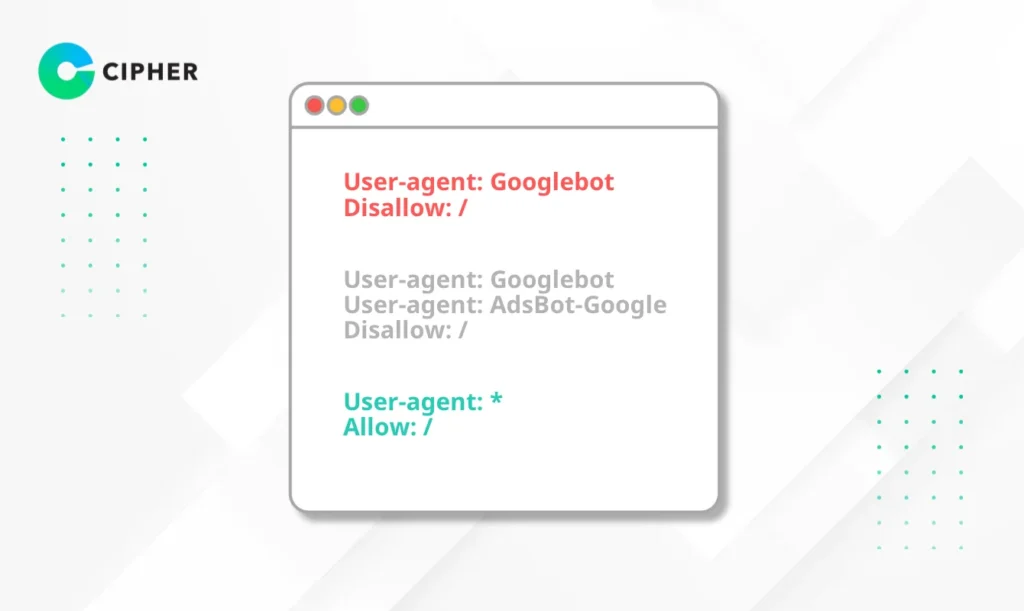
Example 1: Apply rules only to Google
User-agent: Googlebot
Disallow: /
Example 2: Apply rules to multiple search engines
User-agent: Googlebot
User-agent: AdsBot-Google
Disallow: /
Example 3: Apply rules to all search engines
User-agent: *
Allow: /
Defining different User-agents allows you to control access for each bot separately. For example, you might allow Google to access all sections but restrict access for other bots.
Disallow
The Disallow command tells which parts of the website crawlers cannot access. You can specify folders or specific files. The more specific you can be, the better control you have.
Examples
Disallow: /admin/ # Prohibit access to all admin folders
Disallow: /wp-admin/ # For WordPress, prohibit access to admin pages
Disallow: /private-file.html # Prohibit access to specific files
The Disallow command is very important for protecting areas you don’t want to appear in search results, such as admin pages, which often contain important information that shouldn’t be disclosed.
Allow
The Allow command permits search engines to access specified webpages or folders, even if there’s a Disallow command previously. It creates exceptions to Disallow commands. The writing format is the same as Disallow.
Examples
Example: Prohibit access to everything but allow only the public folder
User-agent: *
Disallow: /
Allow: /public/
Example: Allow the entire website
User-agent: *
Allow: /
This specificity helps you control access in detail without having to open or close everything.
Sitemap
The Sitemap command helps web crawlers know where your sitemap is located. This is a file that lists all pages you want to appear in search results, making it easier for search engines to find and index your webpages.
Examples
Sitemap: https://www.yourwebsite.com/sitemap.xml
Specifying a Sitemap in your Robots.txt file helps search engines discover your new pages faster and better understand your website structure, which is beneficial for SEO.
How to Create a Robots.txt File
1. Create a Robots.txt File Manually and Upload to Your Website
Write the Robots.txt file in Notepad (Windows) or TextEdit (Mac)
- Open a Text Editor like Notepad, TextEdit, or VS Code
- Write the desired commands
- Save the file as “robots.txt”
- Upload the file to the root directory of your website via FTP or File Manager in your hosting
- Check that the file is accessible at https://www.yourdomain.com/robots.txt
2. Create a Robots.txt File Using Plugins
For WordPress users, creating WordPress Robots.txt is easy with plugins
- Yoast SEO – This popular plugin has a Robots.txt management feature in the “SEO” > “>Tools” >> “Edit Files” menu
- All in One SEO – Go to “All in One SEO” > >”Tools” > >”Robots.txt Editor”
- Rank Math – Go to “Rank Math” >> “General Settings” > >”Edit robots.txt”
This method is suitable for those not comfortable with directly editing files and helps prevent potential errors. Using plugins for managing WordPress Robots.txt also offers additional features that assist in SEO.
Elevate Your Website's Performance with CIPHER!
At CIPHER, we have a team of SEO experts ready to help optimize your Robots.txt file and other SEO components of your website to work at maximum efficiency.
Our Services:
- Website creation with SEO-friendly structure from the beginning
- Comprehensive SEO services for both On-page and Off-page
- Maintenance and optimization of WordPress websites, including appropriate WordPress Robots.txt configuration
- Analysis and resolution of SEO issues that may arise from incorrect Robots.txt settings
SEO is an ongoing process, and Robots.txt is just one part of the overall picture. For the best results, working with experts like CIPHER will ensure that all components of your website are properly optimized.
Conclusion